Renaming elements
Renaming elementsRenaming elements without activating aliases? Yes we can!
The dimension editor and dimension worksheets cannot rename elements directly, so let me introduce you to SwapAliasWithPrincipalName.
In this example, we will add a padding "0" to an existing set of elements without rebuilding the dimension from scratch.
Before swap:
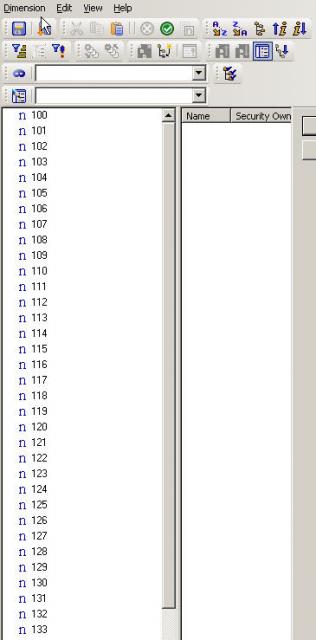
- Create a new alias "new" in the Dimension, by default the new elements are identical
- Change all required elements to their new names in that alias. Below we pad a zero in front of all elements
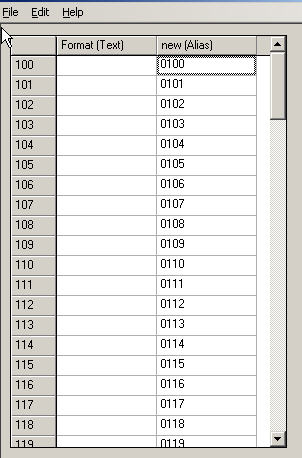
Now create a new TI with the following line in the Prolog Tab:
SwapAliasWithPrincipalName(Dimension,'new',0);
The third parameter needs to be zero to execute the swap. If you know if it has any purpose, please leave a comment to enlighten us.
After swap:
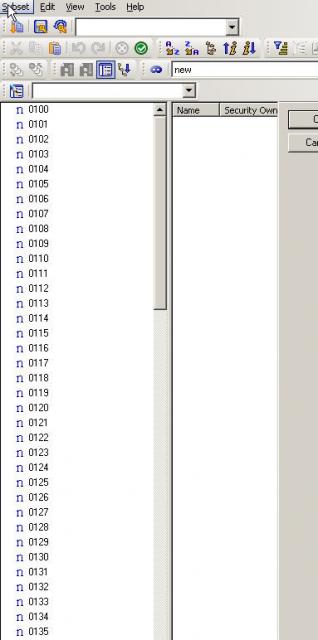
And the "old" elements have become the "new" alias:
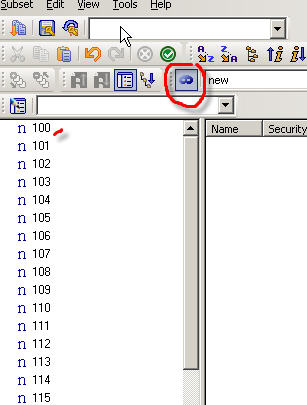
/!\Make sure the associated dimension worksheet is also updated if there is one!!!
This was tested successfully under v. 9.0.3 and v. 9.4.
This TI function is listed in the TM1 documentation, however there is no description of its function and syntax.
Click on the RTFM FAIL tag to find out some other poorly documented or simply undocumented TM1 functions.