
users
users
Tracing TM1 references
Homemade TM1 reports can get quite convoluted and users might get a hard time updating them as it is difficult to tell where some TM1 formulas are pointing to.
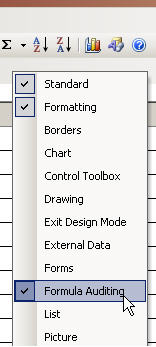
The excel formula auditing toolbar can be useful in such situations.
- right click next to the top bar to bring up the bars menu
- select "Formula Auditing" bar
Publish Views
Publishing users' view is still far from a quick and simple process in TM1.
First, the admin cannot see other users' views.
Second, users cannot publish their own views themselves.
So publishing views always require a direct intervention from the admin, well not anymore :)
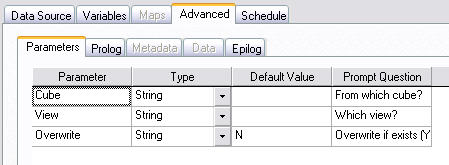
1. create a process with the following code
in Advanced->Parameters Tab
Cube Viewer tips
Columns width
When you have a view with a lot of dimensions displayed, it happens that most of the screen estate is consumed by the dimensions columns and you find yourself scrolling a lot left and right to read the data points.
To ease that problem:
-
choose the shortest aliases for all dimensions from the subset editor
-
choose subset names as short as possible
-
uncheck the Options->Expand Row Header
Excel/Perspectives Tips
Synchronising Excel data
. to reduce the probability of crashing your Excel, disable Automatic Calculation : Go to Tools->Options-> Calculation Tab then click on the Manual button
You can use:
- F9 to manually refresh all the open workbooks
- Shift F9 to refresh only the current worksheet
- F2 and Enter key (i.e. edit cell) to refresh only 1 cell
TM1Web
- To get cube views to display much faster in tm1web: subsets of the dimensions at the top must contain only 1 element each
- Clicking on the icons in the Export dropdown menu will have no effect, only clicking on the associated text on the right "slice/snapshot/pdf" will start an export
Subset Editor
Tree View
To display consolidated elements below their children: View -> Expand Above
Faster Subset Editor
In order to get a faster response from the subset editor, disable the Properties Window:
View -> Properties Window
or click the "Display Properties Window" from the toolbar
Updating an existing subset
to add one or more elements in an existing subset without recreating it:
from the subset editor
Users
Tips for TM1 users: